Synopsis
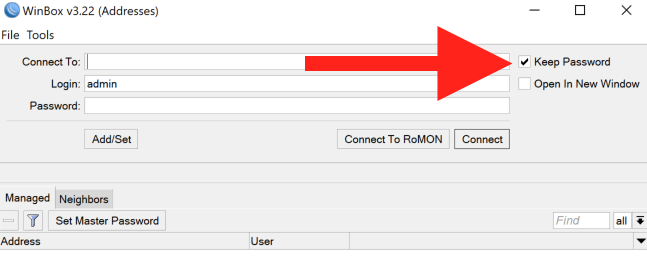
MikroTik's WinBox stores the user's cleartext password in a configuration file when the Keep Password option is selected. Keep Password is enabled by default.
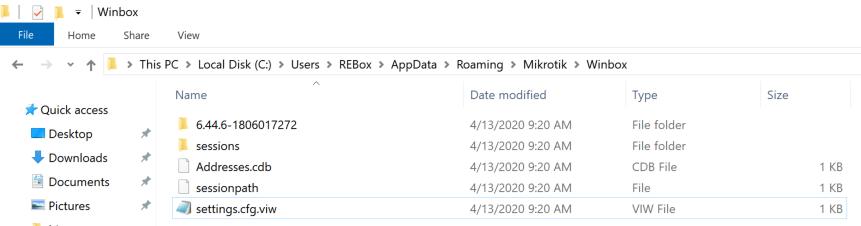
Specifically, the password is stored in a file called settings.cfg.viw in Winbox's AppData/Roaming directory. The full path is C:\Users\USERNAME\AppData\Roaming\Mikrotik\Winbox\settings.cfg.viw
The username and password can be found appended to the keywords login and pwd respectively.
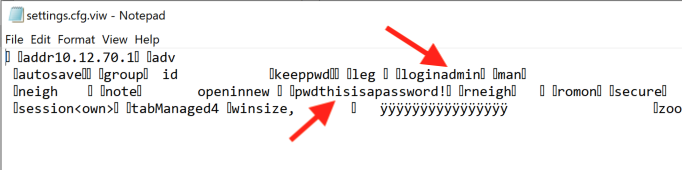
An attacker that gains access to this file can use it to pivot to the router.
Solution
This issue affects all known versions of WinBox. However, to mitigate this issue, MikroTik suggests using WinBox's "Set Master Password" functionality.
Additional References
https://cwe.mitre.org/data/definitions/260.htmlhttps://wiki.mikrotik.com/wiki/Manual:Winbox
Disclosure Timeline
All information within TRA advisories is provided “as is”, without warranty of any kind, including the implied warranties of merchantability and fitness for a particular purpose, and with no guarantee of completeness, accuracy, or timeliness. Individuals and organizations are responsible for assessing the impact of any actual or potential security vulnerability.
Tenable takes product security very seriously. If you believe you have found a vulnerability in one of our products, we ask that you please work with us to quickly resolve it in order to protect customers. Tenable believes in responding quickly to such reports, maintaining communication with researchers, and providing a solution in short order.
For more details on submitting vulnerability information, please see our Vulnerability Reporting Guidelines page.
If you have questions or corrections about this advisory, please email [email protected]
Tenable One
Request a demo
The world’s leading AI-powered exposure management platform.
Thank You
Thank you for your interest in Tenable One.
A representative will be in touch soon.
Form ID: 7469
Form Name: one-eval
Form Class: c-form form-panel__global-form c-form--mkto js-mkto-no-css js-form-hanging-label c-form--hide-comments
Form Wrapper ID: one-eval-form-wrapper
Confirmation Class: one-eval-confirmform-modal
Simulate Success