Dynamic Objects in Active Directory: The Stealthy Threat

Active Directory’s "dynamic objects" feature offers attackers a perfect evasion cloak. These objects automatically self-destruct without a trace, so they allow adversaries to bypass quotas, pollute access lists, and persist in the cloud, leaving forensic investigators with nothing to analyze.
Wichtigste Erkenntnisse
- The threat: Dynamic objects self-delete without leaving any traces, or “tombstones” in AD parlance, hindering security teams’ post-attack audits. For example, the machine account quota (MAQ) default configuration lets attackers create machine accounts and use them for malicious purposes, but usually attackers cannot delete them afterwards. However, dynamic objects allow attack traces to self-destruct.
- The impact: While the dynamic object itself disappears, its footprint remains. The deletion leaves behind confusing "ghost" data, such as unresolved security identifiers (SIDs) in critical access control lists (ACLs), broken group policy object (GPO) links, and stale Entra ID users. These artifacts break logical links and make forensic reconstruction nearly impossible because the source object no longer exists.
- The defense: Because post-mortem forensics fail, you must detect the attack while it is active. Security teams must implement near real-time monitoring and alerting for the creation of objects with entryTTL or msDS-Entry-Time-To-Die attributes and correlate them with orphan SIDs to identify the breach before the evidence destroys itself.
Active Directory lets administrators create entries that delete themselves at a pre-determined time. However, these entries, called dynamic objects, can be stealthily abused by attackers in multiple ways that leave no forensic traces. Read on to learn more about these threats and how you can protect your organization.
What is a dynamic object?
In simple terms, a dynamic object is an AD object with a built-in timer. When you create one, you assign it a time-to-live (TTL).
- The attribute entryTTL acts as a countdown (in seconds).
- When the counter hits zero, the AD garbage collector instantly deletes the object.
- Unlike standard AD objects, dynamic objects do not go to the recycle bin or become traceable "tombstones." They simply vanish.
This "tombstone bypass" creates a forensic nightmare when attackers abuse dynamic objects. Once the object expires, its metadata is gone. There is no way to restore it or see who created it, leaving only indirect artifacts like broken links or orphan security IDs.
A more technical look at dynamic objects
To create these temporary objects, you specify the auxiliary class dynamicObject during the creation. This schedules the object for automatic deletion by the AD Garbage Collector (GC) once its TTL expires.
Dynamic objects have two attributes indicating when the object will be deleted. They are in-sync but represent the date in different formats:
- msDS-Entry-Time-To-Die: Holds the absolute expiration time of a dynamic object in the directory.
- entryTTL: Represents a countdown in seconds until the self-deletion of the object. It can be updated to reduce or extend the duration, and the msDS-Entry-Time-To-Die will be updated accordingly.
As stated, once dynamic objects expire, they’re fully deleted, leaving behind only indirect artifacts, such as logs, cached Kerberos tickets, and linked attributes on other objects.
However, dynamic objects are not always purged the instant their TTL hits zero. In our tests, deletion was instantaneous on freshly rebooted domain controllers, but we observed delays of up to 15 minutes on systems that had been up for under 24 hours. For security teams, this delay is significant as it provides a brief “extended” window to inspect or back up the object’s attributes for forensic purposes before it is permanently removed.
While dynamic objects technically support a TTL between one second and one year, the actual constraints are managed via the msDS-Other-Settings attribute in the Configuration partition. This attribute controls both the minimum allowed duration (DynamicObjectMinTTL) and the default duration (DynamicObjectDefaultTTL) applied when no value is provided during object creation.
Dynamic objects are unsupported in the Configuration and Schema partitions. This is very important from a security and stability perspective: It prevents the use of these temporary objects in the most sensitive areas of Active Directory. Allowing these would be disastrous For instance, if a schema class were to disappear automatically, any object relying on that class would become corrupted, leading to significant integrity issues.
For foundational concepts, consult:
- https://learn.microsoft.com/en-us/archive/blogs/pfesweplat/ad-object-detection-detecting-the-undetectable-dynamicobject
- https://medium.com/@nannnu/fun-with-dynamic-objects-in-ad-part-1-743c21dd934f
Next, we’re going to outline six scenarios showing how attackers weaponize dynamic objects.
Scenario 1 - Bypassing machine account quotas
By default, ms-DS-MachineAccountQuota allows any authenticated user to create ten computer objects. Attackers create these computer accounts for techniques like resource-based constrained delegation (RBCD) abuse or sAMAccountName spoofing (specifically CVE-2021-42278 and CVE-2021-42287 where an attacker renames a machine account to impersonate a domain controller).
However, once the quota is full, attackers are blocked, and the malicious accounts remain as evidence. Or if the attack fails to get elevated privileges, they cannot delete the machine accounts they created. This leaves behind a permanent evidence for defenders.
But attackers can modify their scripts using, for example, PowerMad to create dynamic machine accounts. The New-MachineAccount function fills the required attributes and creates the machine account. To use a dynamic object for that purpose, there is only one change to make: replace the line below …
$request.Attributes.Add((New-Object
"System.DirectoryServices.Protocols.DirectoryAttribute" -ArgumentList
"objectClass","Computer")) > $null
… with this one:
$request.Attributes.Add((New-Object
"System.DirectoryServices.Protocols.DirectoryAttribute" -ArgumentList
"objectClass", "dynamicObject", "Computer")) > $null
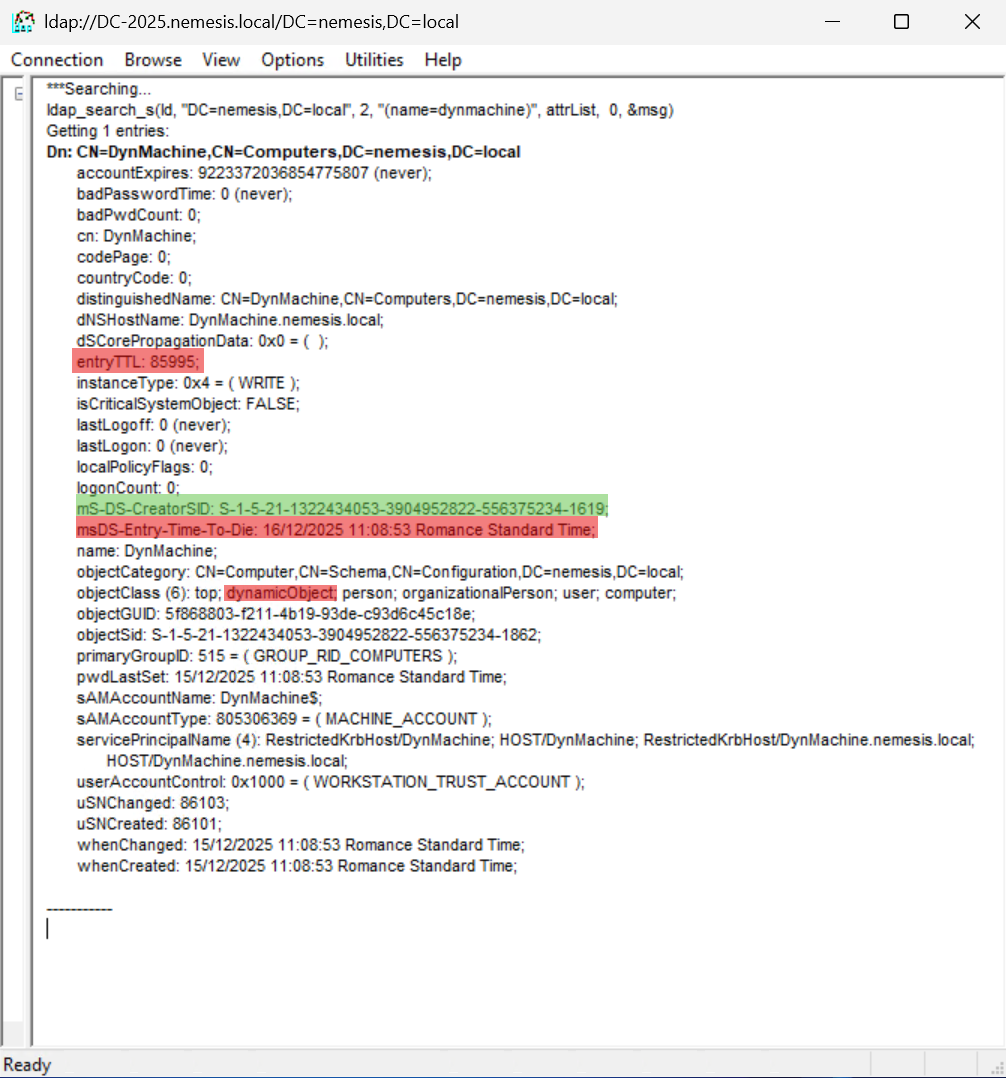
Detailed view of an AD dynamic object (computer) highlighting the expiration attributes.
If the attack fails or finishes, the machine account automatically deletes itself after 24 hours. The quota slot is freed up for re-use, and the evidence of the malicious computer account disappears completely.
Let’s look at this process in more detail.
We attempted to define a custom, short TTL of 60 seconds. However, due to the privilege restrictions applied to standard user accounts, this request was rejected. Consequently, we had to resubmit the request without specifying the TTL. As a result, the system applied the default lifetime value defined in msDS-Other-Settings\DynamicObjectDefaultTTL: a 24-hour (86,400 seconds) expiration.
After this period ends, the machine account is silently and completely removed, bypassing standard retention mechanisms.
Hinweis: When creating dynamic users or groups with the PowerShell code example (courtesy of Microsoft), we can see the value of the entryTTL and msDS-Entry-Time-To-Die attributes in the Active Directory Users and Computers (ADUC) management console.
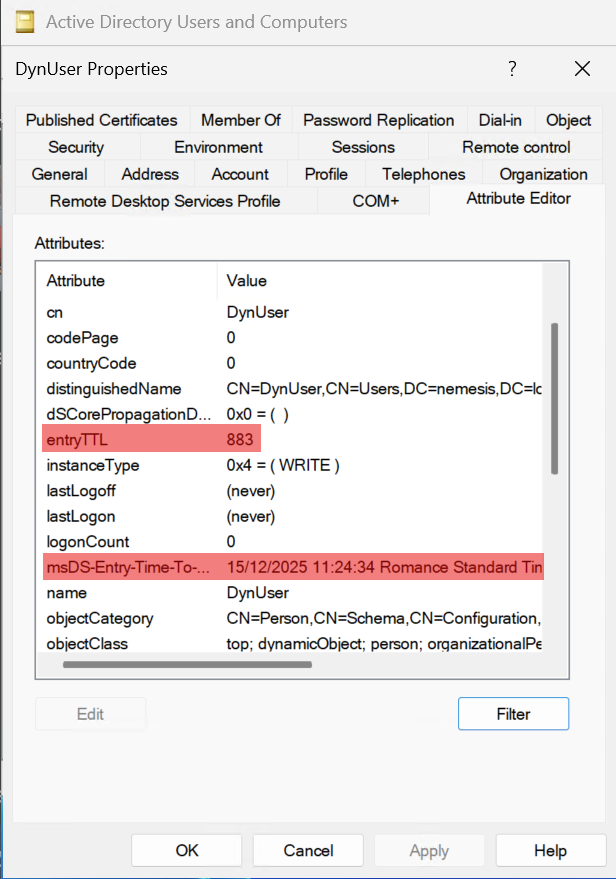
Attribute Editor view of an AD dynamic object (user) illustrating the active entryTTL countdown and its corresponding deletion timestamp.
Curiously, for dynamic machine accounts created via MAQ, the entryTTL attribute is not visible within ADUC. However, verification with LDP.exe proves the attribute is set correctly, and indicates a limitation in the Microsoft Management Console (MMC). (See previous screenshot with LDP.exe related to the same “DynMachine” object.)

Attribute Editor view of an AD dynamic object (computer) where the entryTTL attribute incorrectly displays <not set>, illustrating a bug in the MMC.
However, the msDS-Entry-Time-To-Die attribute appears as expected.
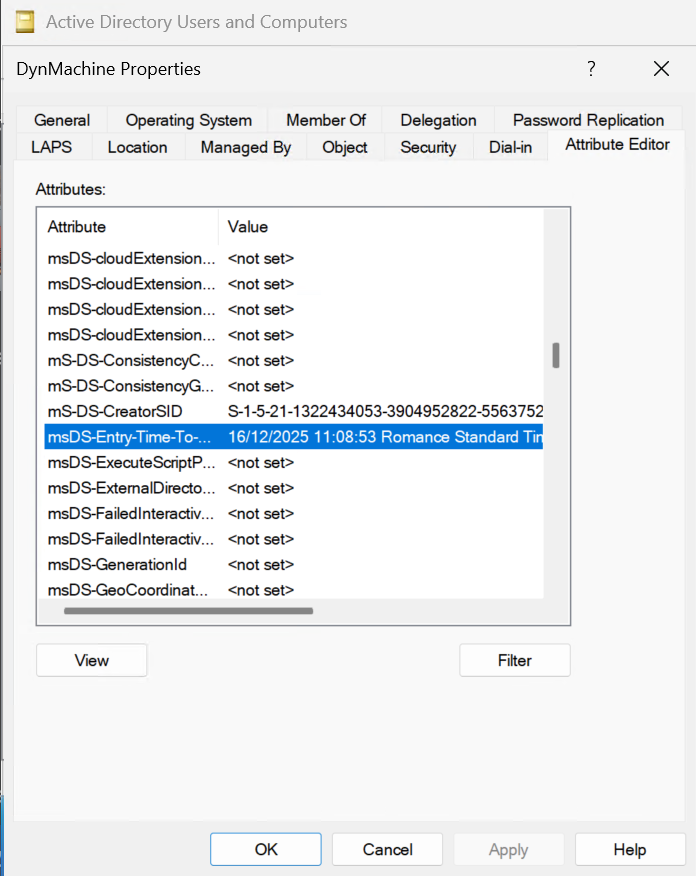
Attribute Editor view of an AD dynamic object (computer) showing the msDS-Entry-Time-To-Die timestamp, while simultaneously failing to display the entryTTL.
The primary defense strategy is unchanged: the MAQ should effectively be disabled by setting it to zero. Tenable Identity Exposure facilitates this hardening process by flagging vulnerable configurations via the Users Allowed to Join Computers to the Domain indicator of exposure (IoE).
Scenario 2 - Primary Group ID corruption
In this attack scenario, the attacker leverages the primaryGroupID (PGID) attribute by setting a user’s PGID to the relative identifier (RID) of a dynamic group. This grants the user implicit membership that doesn't show up in the standard tools memberOf attribute, making it “'invisible” in common administrative tools. However, the membership remains fully functional for Kerberos tickets and access tokens.
When the dynamic group expires and is deleted, the user is left with a non-existent RID. This makes auditing much more difficult. Furthermore, because AD doesn't automatically clean up the PGID when a group is deleted, the user is left with a corrupted attribute that points to a broken reference to a non-existent object.
Let’s look at this in more detail.
Normally, if you assign the PGID of a group to a user, the group cannot be deleted.
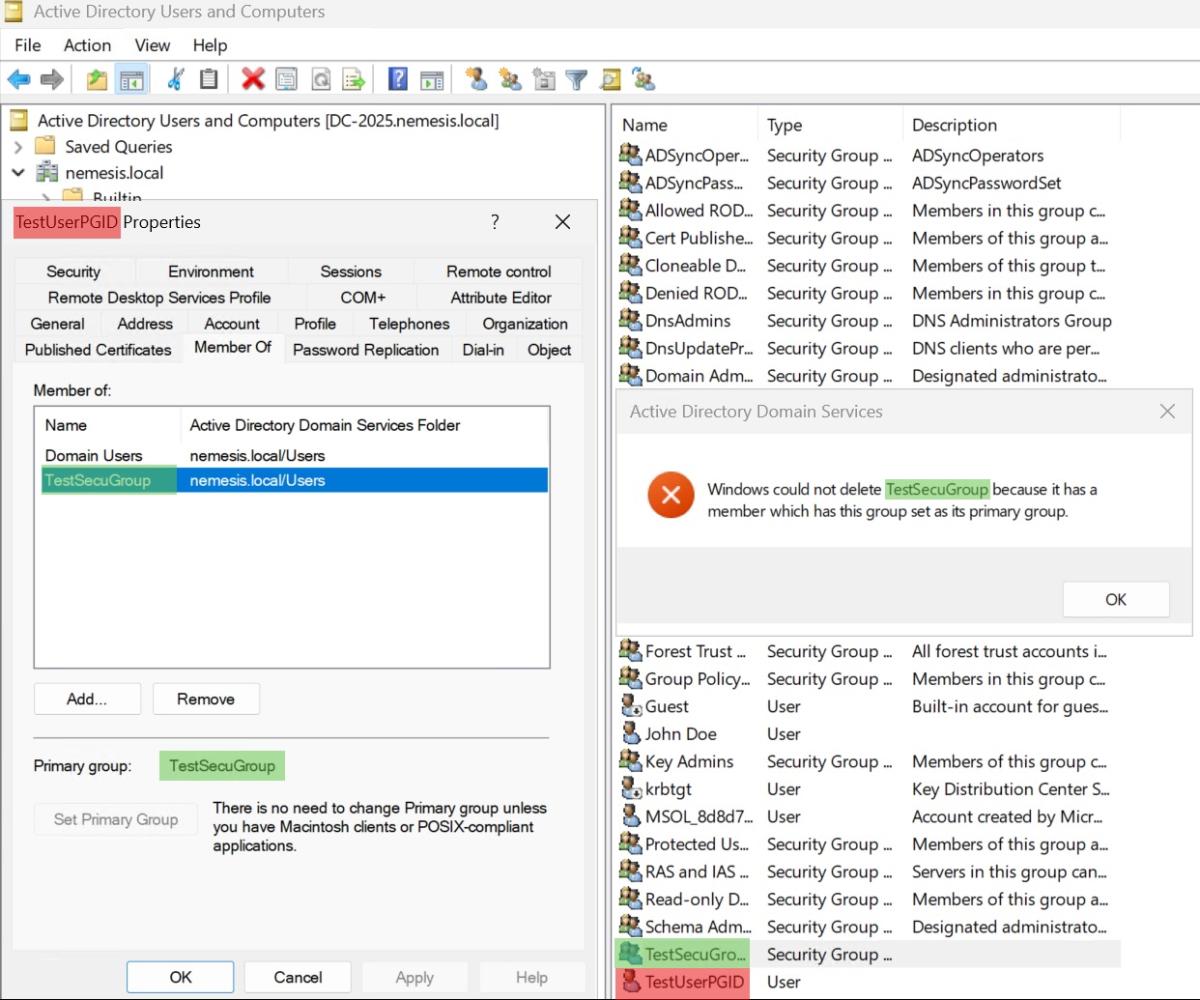
ADUC error message demonstrating that a security group cannot be deleted because it is currently assigned as the Primary Group for a user (TestUserPGID).
This raises a question: Does the protection of the PGID group removal take precedence over the dynamic object TTL?
For this scenario, we created a dynamic group “DynGroup”, and added “TestUserPGID” as a member of the group. Finally, we set the PGID of “DynGroup” to “TestUserPGID”.
To test this, we established the following configuration:
- Created a dynamic group named “DynGroup”.
- Added “TestUserPGID” as a member.
- Updated the primaryGroupID of the user “TestUserPGID” to match the RID of the dynamic group.
First, we attempted to manually delete the group using standard administrative tools. As anticipated, the operation was blocked, due to the same consistency error observed in the previous test.
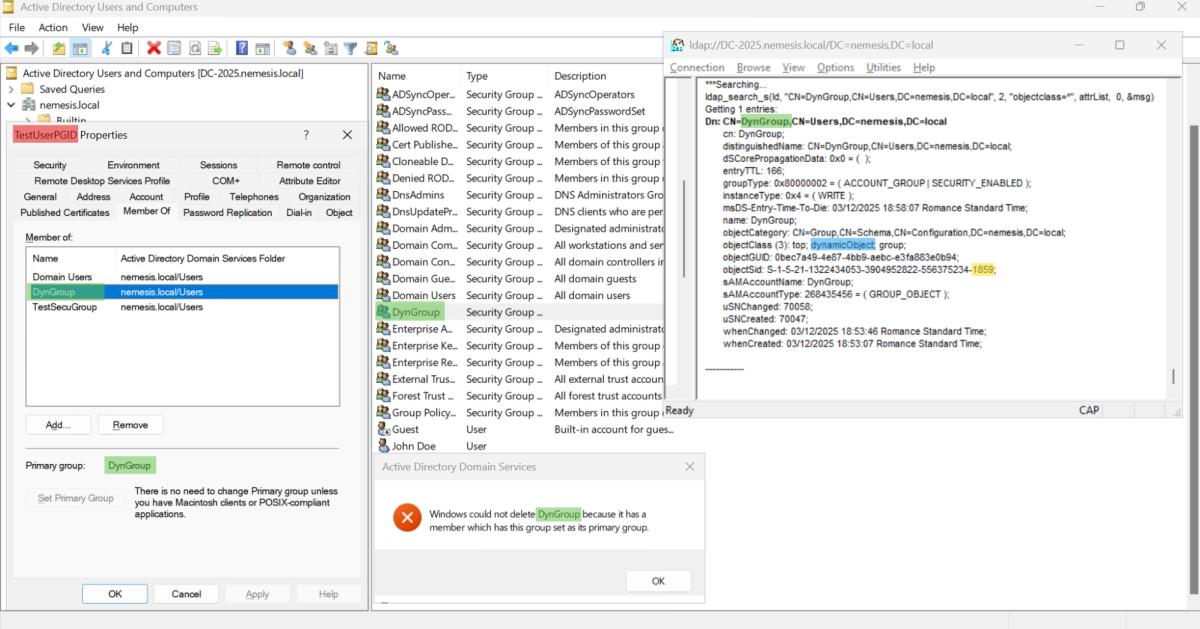
Attempt to delete a dynamic group that fails because it is currently assigned as a user’s Primary Group.
Later when the object expired, the dynamic group was automatically deleted by the system. However, this deletion did not trigger a cleanup of the user's primaryGroupID attribute. As a result, it now points to a non-existent object.

Orphaned user account after its dynamic primary group has expired, resulting in a missing group record and a broken <None> primary group assignment in the MMC.
This introduces the risk of unforeseen side effects. At the very least, this breaks referential integrity generating residual “garbage” that persists in the AD database.
Moreover, if this dynamic group had high-level privileges, its automated deletion would create a significant forensic gap. Since dynamic objects bypass the standard tombstone lifecycle, defenders would find no record of the group itself. This ephemeral lifetime obscures the origin of the user's privileges, complicating root cause analysis and incident response.
To mitigate this risk, organizations should strictly limit modifications to the primaryGroupID attribute. Security teams can leverage Tenable Identity Exposure to continually monitor for these deviations using the User Primary Group IoE.
Scenario 3 - Orphan SID and AdminSDHolder pollution
This scenario is likely the first risk that comes to mind once you understand the lifecycle of dynamic objects.
To demonstrate its severity, we won't just look at a standard file server ACL. We are going to target the AdminSDHolder object.
Why AdminSDHolder? We chose this target because it acts as the security template for all privileged groups and users in AD. Any permission added here is automatically propagated to every Tier-0 account by the SDProp process. As a result, security tools will flag an "unresolved SID" (a string of numbers) with administrative rights. Investigators can see that someone had access, but they can’t determine who it was. This allows us to demonstrate how a single ephemeral object can pollute the entire privileged landscape of a domain in under 60 minutes.
Let’s look at the process in more detail.
For this test, let’s compare the behavior of a standard deletion versus a dynamic expiration:
- We create two users:
- “User_Standard”: A regular AD user.
- “User_Dynamic”: A dynamic user with a short TTL.
- We add a permissive access control entry (ACE) for both users to the AdminSDHolder ACL.
![LDP view of a security descriptor comparing two ACEs: one assigned to a temporary dynamic user account (Ace[9]) and another to a standard user account (Ace[10])](https://www.tenable.com/sites/default/files/inline/images/8%20-%20LDP%20view%20of%20a%20security%20descriptor%20comparing%20two%20ACEs%20one%20assigned%20to%20a%20temporary%20dynamic%20user%20account%20%28Ace%5B9%5D%29%20and%20another%20to%20a%20standard%20user%20account%20%28Ace10%29.png)
LDP view of a security descriptor comparing two ACEs: one assigned to a temporary dynamic user account (Ace[9]) and another to a standard user account (Ace[10]).
3. The deletion:
a. We wait for the TTL to expire on “User_Dynamic”, which is fully deleted by the system.
b. Immediately after, we delete “User_Standard”, which goes to the recycle bin/tombstone.
Now, let's look at the AdminSDHolder ACLs.
![LDP view of a security descriptor showing two ACEs: an 'Unknown SID' legacy from an expired dynamic object (Ace[9]) and a DN pointing to a standard deleted object in the Deleted Objects container (Ace[10])](https://www.tenable.com/sites/default/files/inline/images/9%20-%20LDP%20view%20of%20a%20security%20descriptor%20showing%20two%20ACEs%20an%20%27Unknown%20SID%27%20legacy%20from%20an%20expired%20dynamic%20object%20%28Ace%5B9%5D%29%20and%20a%20DN%20pointing%20to%20a%20standard%20deleted%20object%20in%20the%20Deleted%20Objects%20container%20%28Ace%5B10%5D%29.png)
LDP view of a security descriptor showing two ACEs: an 'Unknown SID' legacy from an expired dynamic object (Ace[9]) and a DN pointing to a standard deleted object in the Deleted Objects container (Ace[10]).
Typically every 60 minutes, the AdminSDHolder background task resets the ACLs of all privileged objects to match the container's security descriptor.
- “User_Standard”: Security tools will flag the SID, but because the object still exists in the AD. The SID can be resolved to a name, a deletion date, and more attributes.
- “User_Dynamic”: The SID is completely unresolvable. It is an "Orphan SID."
This creates a significant effort for SOC analysts and incident responders. Security tools will report "Unknown SIDs with elevated rights" on your most critical assets.
The forensic investigation is immediately compromised:
- No object recovery: Since dynamic objects skip the recycle bin, there is no object to restore.
- No tombstone: There is no forensic trace of the object's metadata in the directory.
Blue teams waste time verifying if this is a corruption issue or a stealth persistence mechanism, rather than a simple misconfiguration. This creates noise and confusion, potentially intended to distract from real threats.
To catch this, you need security monitoring that tracks the relationship between ACLs and object states in real-time. Tenable Identity Exposure helps identify such anomalies via several IoEs reporting dangerous ACEs on critical assets, including “Ensure SDProp Consistency”. Allowing you to clean this pollution immediately.
Scenario 4 - Orphan gPLink (GPO) and gPCFileSysPath abuse
In this scenario, an attacker creates a dynamic GPO that points to a malicious script on an attacker-controlled server. They link this GPO to an Organizational Unit (OU) to execute code on victim machines.
Once the TTL expires, the GPO object is deleted. Das Ergebnis: The link on the OU remains, but it is "broken" because the GPO itself is gone. This technique strips away the forensic evidence, leaving investigators with a broken link and no payload to analyze.
Here’s a more detailed look.
A standard GPO consists of two parts: the group policy container (GPC) represented by an LDAP object, and files inside the SYSVOL folder (GPT). The GPC contains an attribute called gPCFileSysPath, which tells the computer where to fetch the files to execute.
Hinweis: Unlike in previous tests, we enabled the AD recycle bin to ensure the gPCFileSysPath value persists for the standard object after deletion.
As detailed in Synacktiv's "GPODDITY" research, an attacker can modify this attribute to point not to SYSVOL, but to a malicious, attacker-controlled SMB share.
By combining this spoofing technique with dynamic objects, an attacker can create the following attack:
- The attacker creates a dynamic GPO (with the classes dynamicObject and groupPolicyContainer) and uses a short TTL.
- They set the gPCFileSysPath attribute to point to their malicious server.
- They link this GPO to a sensitive Organizational Unit (OU) by modifying the gPLink attribute on the OU.
- Computers in that OU refresh their policy, read the malicious path, and execute the payload.
As in the previous scenario, we will compare the behavior of a dynamic object against a standard one.
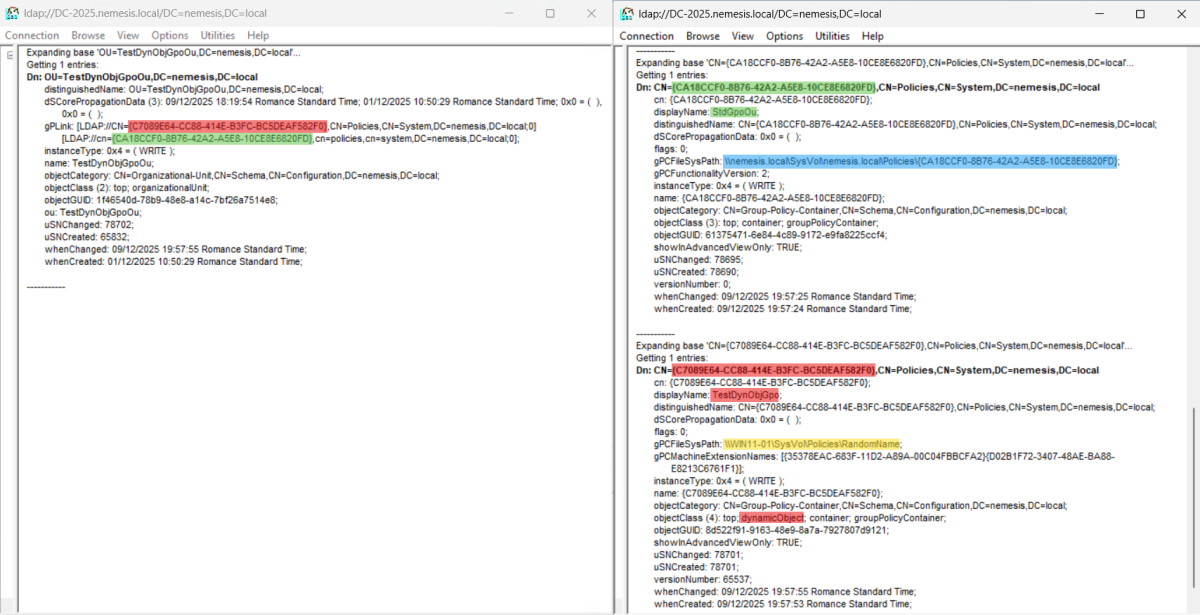
LDP comparison of a standard GPO vs. a dynamicObject GPO, showing how a temporary policy can be linked to an OU with a self-destructing gPCFileSysPath.
5. The TTL expires, then the system fully deletes the GPO object. To make the comparison with a standard object easier, we also delete the “StdGpoOu” at this stage.

LDP view of an Organizational Unit still referencing an expired dynamic GPO in its gPLink attribute, alongside a search confirming the GPO object has been completely removed.
When a standard GPO is deleted, it goes to the recycle bin or tombstone. An analyst can recover it to see what script was executed or where the gPCFileSysPath was pointing.
With a dynamic GPO, there is no tombstone. The object is gone. The attribute containing the malicious path (gPCFileSysPath) is destroyed. The only evidence left is the gPLink on the OU, pointing to a globally unique identifier (GUID) that no longer exists. The analyst sees a "broken link," but they have no way to prove that this missing object was responsible for the code execution, nor can they retrieve the path to the attacker's server to analyze the payload.
Tenable Identity Exposure allows you to detect this immediately via the “GPO Execution Sanity” IoE. Detecting these objects is difficult because they often disappear before a scan can occur. Instead, you can look for the traces and inconsistencies they leave behind. In this case where the dynamic object is a GPO, it leaves more than just an LDAP artifact: it can be identified using methods similar to the “Unlinked, Disabled or Orphan GPOs“ IoE (by looking for structural inconsistencies rather than the objects themselves).
Scenario 5 - Ephemeral DNS record
In our fifth scenario, an attacker can create a dynamic DNS record to redirect traffic (e.g., spoofing a file server) to capture credentials, taking advantage of DNS records that are just standard objects in AD.
Consequently, the victim's computer queries the server and caches the malicious IP address. The dynamic DNS record expires and disappears from the AD server.
As a result, the victim is still compromised (using the cached IP), but the DNS server looks perfectly clean. An analyst checking the server logs will find no record of the malicious entry.
Here’s a more detailed look.
Just like users and groups, AD-integrated DNS records are standard LDAP objects (class dnsNode) stored in the DomainDnsZones or ForestDnsZones partitions. Because they are not located in the Configuration or the Schema partitions, they can be made dynamic.
This capability opens the door for attackers to perform temporary traffic redirection such as spoofing a legitimate server or capturing credentials via a man-in-the-middle technique without leaving a permanent footprint in the directory.
An attacker could create a dynamic DNS record leading to the following consequences:
- The DNS server reads it and answers queries.
- The client caches the answer.
To illustrate the forensic impact, we will compare this against a standard DNS record.
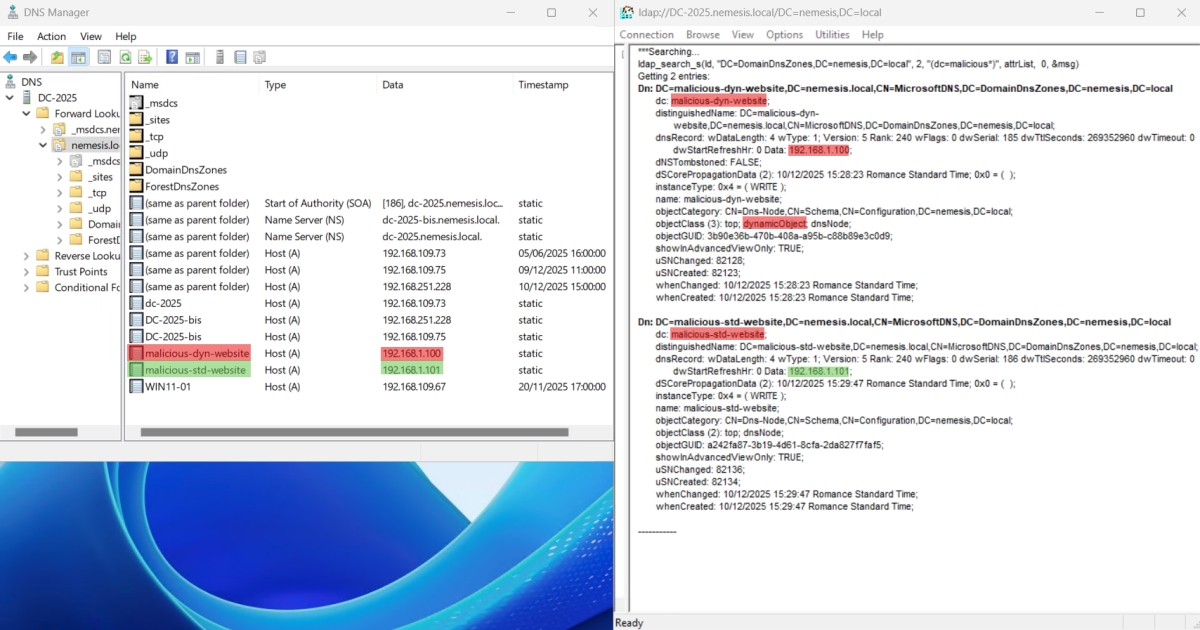
Dual view in DNS Manager and LDP showing a 'malicious-dyn-website' record created as a dynamicObject.
3. The dynamic object self-destructs.
4. The attack continues because the victim is holding the malicious data in their local cache, while the DNS server is completely clean of any trace.

Comparison between an expired dynamic DNS record, which has been permanently purged from the directory, and a standard DNS record that still exists.
Hinweis: If you still see the records in the DNS Manager, it is only because of the DNS cache. A manual refresh will update the view and confirm their deletion.
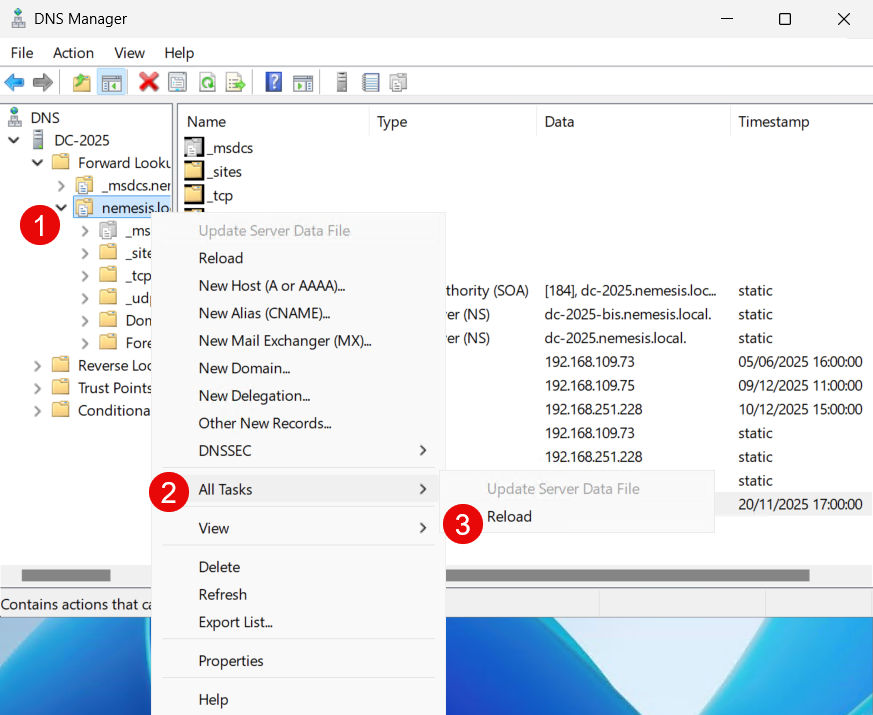
DNS Manager MMC showing the manual 'Reload' task used to refresh the zone and clear expired records.
This results in a discrepancy where the attack persists on the endpoint, but the originating evidence is no longer present in the infrastructure.
It’s not easy to track them because:
- Standard DNS logs rarely capture transient records unless performance-killing debug modes are enabled.
- Just like in the previous scenarios, there is no tombstone, and no records in the AD.
- An analyst investigating a strange connection will check the DNS server and find a perfectly clean zone.
Since the evidence destroys itself, post-mortem analysis is made more difficult. While you could try to catch the configuration change in real-time, distinguishing a malicious record from a legitimate one is difficult and prone to false positives.
The most reliable detection strategy is to flag the anomaly itself: Report any DNS record that is a dynamic object. This can be done with a real-time detection based on the AD replication flow, or with event logs.
Scenario 6 - Hybrid sync gap in Entra ID
In this final scenario, we demonstrate how dynamic objects create persistent artifacts that extend beyond the on-premises domain into Entra ID.
When an attacker creates a dynamic user on Active Directory, Microsoft Entra Connect synchronizes it to the cloud as usual. However, because Entra Connect's delta sync depends on “tombstones” to identify deleted objects, it fails to detect when a dynamic user expires.
Since these objects self-destruct without leaving a trace, the synchronization engine never triggers a deletion in the tenant. Consequently, the cloud user remains active, orphaned, and fully functional on the cloud side.
Let’s dive into the details of this synchronization gap.
To visualize it, we will compare the lifecycle of a synchronized dynamic user against that of a standard user.
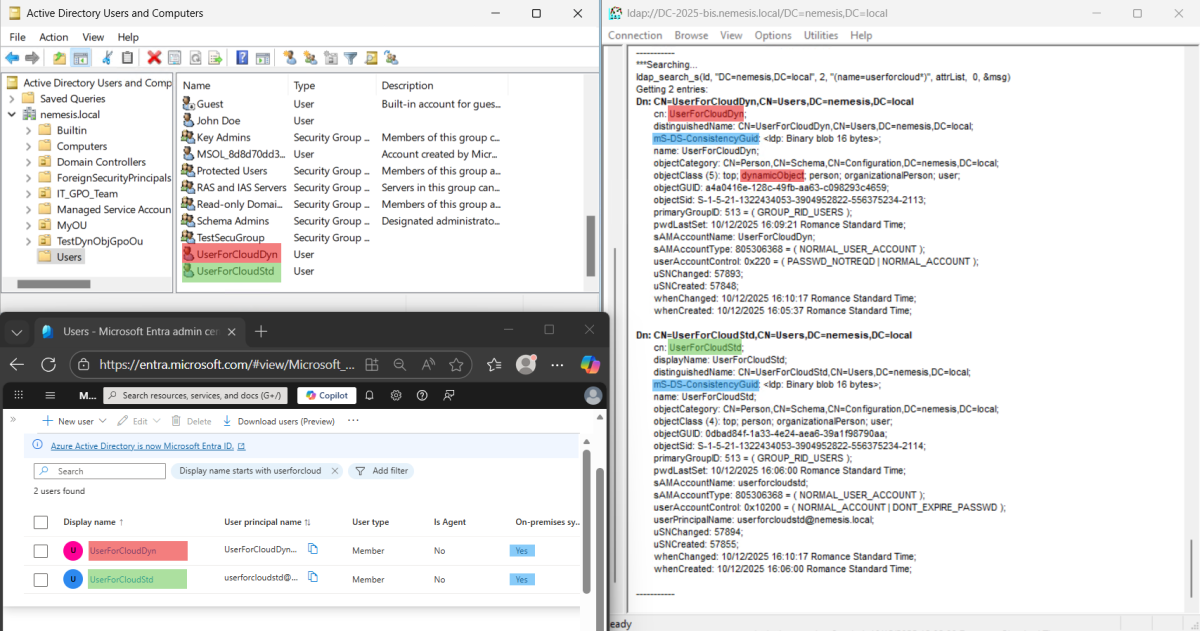
Hybrid identity view showing the synchronization of a dynamicObject (UserForCloudDyn) and a standard user (UserForCloudStd) to Entra ID for comparison.
Once the TTL reaches zero, the dynamic object is self deleted without tombstone, and we manually delete the standard object to identify the differences.
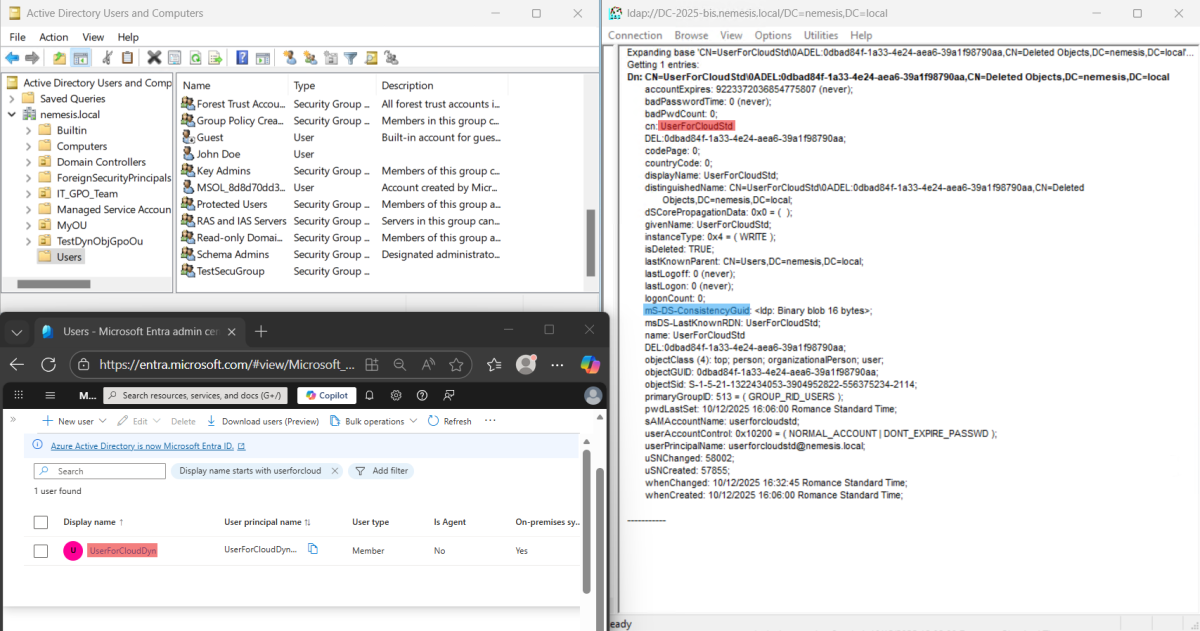
Hybrid identity view showing that an expired on-premises dynamic user ('UserForCloudDyn') still remains active in Entra ID, despite the synchronization cycle.
The standard object deletion has been replicated into the Entra tenant where the Entra user was deleted by Entra Connect, but not the dynamic object deletion, creating a synchronization gap.
Moreover, attempts to manage the object (like resetting a password) prove the object is still active and valid in the cloud, despite the on-prem source being long dead.
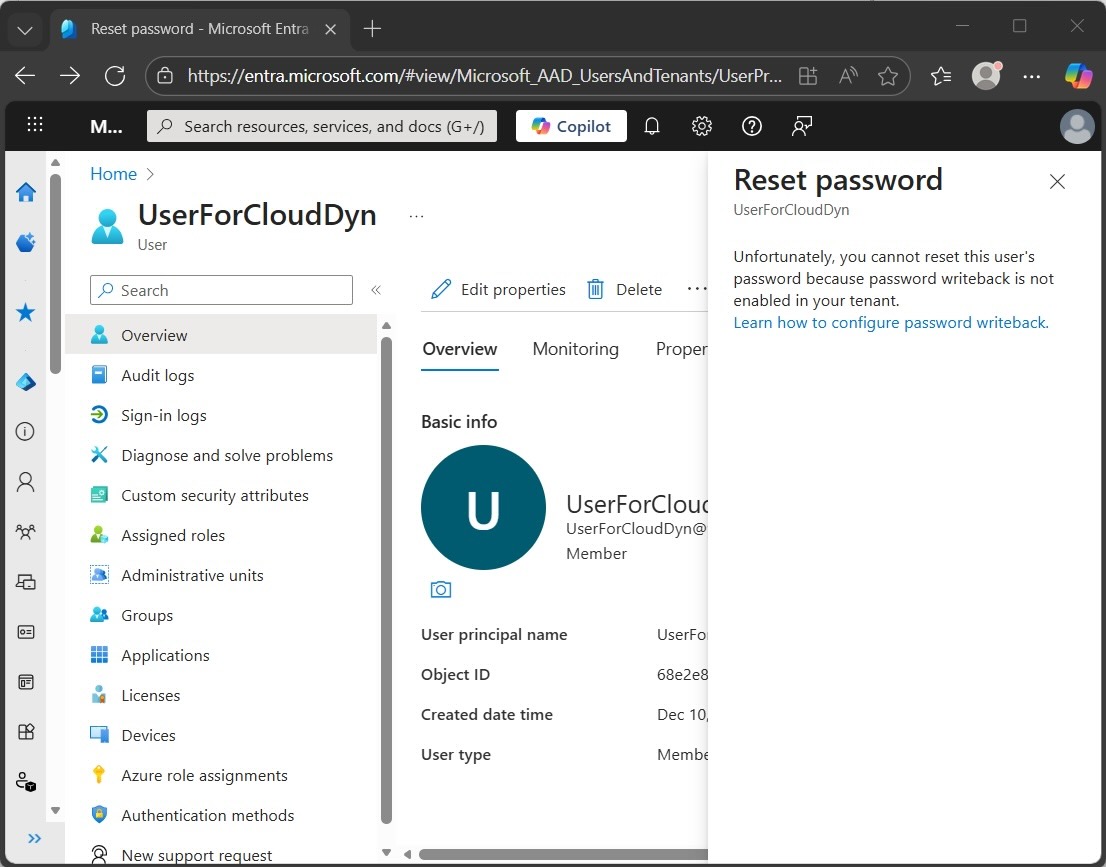
Microsoft Entra admin center view demonstrating an administrative deadlock: the password reset is blocked because the cloud identity remains linked to an on-premises source that has already expired and been purged from Active Directory.
Hinweis: The orphaned Entra user can only be removed by triggering a manual full synchronization in Entra Connect, which re-evaluates all AD objects.
Fazit
Abusing AD dynamic objects turns a standard, yet rarely seen feature into a forensic nightmare. By leveraging self-deletion, attackers can abuse mechanisms like MAQ and DNS spoofing while evading the recycle bin entirely. The impact is not just local. It propagates to the cloud, creating synchronization gaps in Entra ID that persist long after the attack ends.
Because post-mortem analysis is often very difficult with these objects, the only effective defense is to be proactive. Tenable One Identity Exposure has a dedicated IoE (Dynamic Objects Misconfiguration and Usage) and the real-time visibility needed to uncover these ephemeral threats and close the forensic gap. By feeding this identity-first exposure context into the Tenable One exposure management platform, organizations can ensure these stealthy risks are automatically prioritized alongside host vulnerabilities and cloud risks. This unified approach ensures that even if an object "self-destructs," the elevated risk it created is already prioritized within your overall attack surface, leaving adversaries with nowhere to hide, and no way to erase their tracks.
Mehr erfahren




Tenable One
Demo anfordern
Die weltweit führende KI-gestützte Plattform für Exposure Management
Vielen Dank
Vielen Dank für Ihr Interesse an Tenable One.
Ein Vertriebsmitarbeiter wird sich in Kürze mit Ihnen in Verbindung setzen.
Form ID: 7469
Form Name: one-eval
Form Class: c-form form-panel__global-form c-form--mkto js-mkto-no-css js-form-hanging-label c-form--hide-comments
Form Wrapper ID: one-eval-form-wrapper
Confirmation Class: one-eval-confirmform-modal
Simulate Success